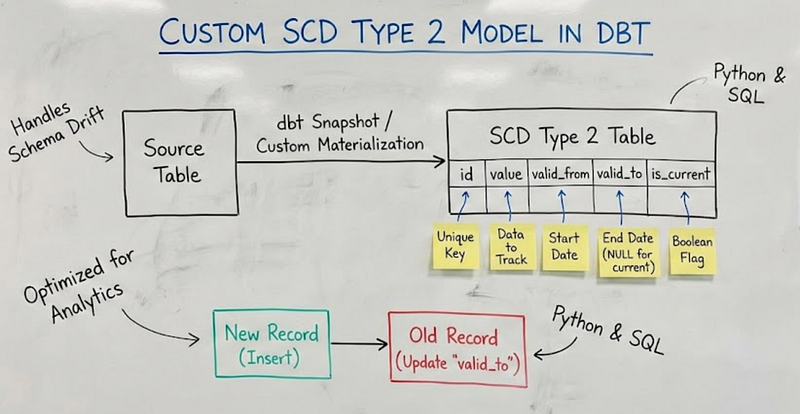
Building robust data warehouses that preserve historical context
Building a custom SCD Type 2 model in dbt is a powerful way to track historical changes without relying solely on the built-in snapshot functionality, giving you more control over the logic. While dbt snapshots are a great, simple solution for many use cases, a custom approach is often necessary when handling more complex scenarios, such as specific merge strategies, backfilling historical data, or dealing with source systems that lack a reliable updated_at column.
The core of the custom logic involves a few key steps within a dbt model materialized as an incremental table.
Step-by-Step Logic for Custom SCD Type 2
Your dbt model will use the incremental materialization, which allows dbt to smartly update and insert records based on your logic, rather than rebuilding the entire table every time. Here's a breakdown of the SQL logic you'd write:
- Identify New and Changed Records: You’ll start by selecting all records from your source table (e.g.,
stg_customers). A common and robust way to detect changes is to create a hash of the columns you want to track. Thedbt-utilspackage has a handysurrogate_keymacro for this. If the hash of a new record is different from the hash of the latest version of that record in your dimension table, you know a change has occurred. - Expire Old Records: This is the most critical part of the SCD Type 2 logic. For every record in your source data that has a new, different version (detected in the previous step), you need to “close out” the old, currently active record in your dimension table. You do this by setting its
end_dateto the timestamp of the new record's arrival and changing itsactive_flagfromYtoN. - Insert New Records: For every new or changed record from your source data, you’ll insert a new row into your dimension table. This new row will have the updated information, a
start_dateset to the current timestamp, and theend_dateset to a future value (like '9999-12-31') to indicate it's the current, active version. Itsactive_flagwill beY.
This process ensures that your dimension table is always up-to-date with the latest information, while also preserving a full, historical timeline of every change. The dbt-utils package and incremental materialization make writing this custom logic much simpler than writing raw SQL.
Let’s illustrate this with a simple example:
Before Change:
customer_id | name | city | active_flag | start_date | end_date
1001 | John Smith | New York | Y | 2023-01-01 | 9999-12-31
After John moves to Boston:
customer_id | name | city | active_flag | start_date | end_date
1001 | John Smith | New York | N | 2023-01-01 | 2023-06-15
1001 | John Smith | Boston | Y | 2023-06-15 | 9999-12-31
dbt Implementation Architecture
Our SCD Type 2 implementation follows a three-layer architecture:
Source System (CRM) → Staging Layer → Intermediate Layer → Mart Layer
1. The Staging Layer
First, we extract raw customer data from TechMart’s CRM system:
-- models/staging/stg_crm__customers.sql
select
 customer_id,
 row_id,
 customer_name,
 first_name,
 last_name,
 email_address,
 phone_number,
 annual_income,
 city,
 marketing_consent_email,
 marketing_consent_sms,
 contact_preference,
 last_modified_date,
 operation_type -- INSERT, UPDATE, DELETE
from {{ source('crm', 'customers') }}
2. The Intermediate Layer
Here we add SCD-specific logic and generate unique identifiers:
-- models/intermediate/int_crm__customers_scd.sql
select
 *,
 {{ dbt.generate_surrogate_key([
 'customer_id',
 'customer_name',
 'email_address',
 'phone_number',
 'city',
 'marketing_consent_email'
 ]) }} as scd_id,
 coalesce(last_modified_date, current_timestamp) as effective_start_date
from {{ ref('stg_crm__customers') }}
3. The Mart Layer — The SCD Type 2 Magic
Now comes the complex part — the actual SCD Type 2 implementation:
-- models/marts/dim_customers.sql
{{
 config(
 materialized='incremental',
 unique_key='scd_id',
 incremental_strategy='delete+insert'
 )
}}

with source_rows as (
 select
 customer_id,
 customer_name,
 first_name,
 last_name,
 email_address,
 phone_number,
 annual_income,
 city,
 marketing_consent_email,
 marketing_consent_sms,
 contact_preference,
 effective_start_date,
 null as effective_end_date,
 scd_id
 from {{ ref('int_crm__customers_scd') }}
)

{% if is_incremental() %}
 , destination_rows as (
 select
 customer_id,
 customer_name,
 first_name,
 last_name,
 email_address,
 phone_number,
 annual_income,
 city,
 marketing_consent_email,
 marketing_consent_sms,
 contact_preference,
 effective_start_date,
 effective_end_date,
 scd_id
 from {{ this }}
 where active_flag = 'Y'
 )

 , new_valid_to as (
 select
 d.customer_id,
 s.effective_start_date as effective_end_date
 from source_rows s
 join destination_rows d
 on s.customer_id = d.customer_id
 and s.scd_id != d.scd_id

 )

 , add_new_valid_to as (
 select
 d.customer_id,
 d.customer_name,
 d.first_name,
 d.last_name,
 d.email_address,
 d.phone_number,
 d.annual_income,
 d.city,
 d.marketing_consent_email,
 d.marketing_consent_sms,
 d.contact_preference,
 d.effective_start_date,
 n.effective_end_date,
 d.scd_id,
 case when n.effective_end_date is null then 'Y' else 'N' end as active_flag
 from destination_rows d
 left join new_valid_to n
 on d.customer_id = n.customer_id

 )

 select
 customer_id,
 customer_name,
 first_name,
 last_name,
 email_address,
 phone_number,
 annual_income,
 city,
 marketing_consent_email,
 marketing_consent_sms,
 contact_preference,
 effective_start_date,
 effective_end_date,
 active_flag,
 scd_id
 from add_new_valid_to n
 union
{% endif %}

select
 s.customer_id,
 s.customer_name,
 s.first_name,
 s.last_name,
 s.email_address,
 s.phone_number,
 s.annual_income,
 s.city,
 s.marketing_consent_email,
 s.marketing_consent_sms,
 s.contact_preference,
 s.effective_start_date,
 coalesce(
 lead(s.effective_start_date, 1) over (
 partition by s.customer_id
 order by s.effective_start_date
 ),
 '9999-12-31'::timestamp
 ) as effective_end_date,
 case
 when lead(s.effective_start_date, 1) over (
 partition by s.customer_id
 order by s.effective_start_date
 ) is null then 'Y'
 else 'N'
 end as active_flag,
 s.scd_id
from source_rows s
Breaking Down the Complex Logic
Let’s examine the key components:
1. Window Functions for Temporal Logic
The heart of SCD Type 2 lies in understanding temporal relationships:
lead(effective_start_date) over (
 partition by customer_id
 order by effective_start_date
)
This window function looks at the next record for the same customer. If there’s no next record, this is the current active version.
2. Active Flag Determination
case
 when lead(effective_start_date) over (...) is null then 'Y'
 else 'N'
end as active_flag
Only the latest record for each customer gets an active flag of ‘Y’.
3. Effective End Date Calculation
coalesce(
 lead(effective_start_date) over (...),
 '9999-12-31'
) as effective_end_date
The end date is either the start date of the next record, or our “forever” date (9999–12–31).
Incremental Processing
The real complexity emerges in incremental runs. We need to:
- Identify existing active records that need to be closed
- Update their end dates and active flags
- Insert new records from the source
{% if is_incremental() %}
 , destination_rows as (
 select
 customer_id,
 customer_name,
 first_name,
 last_name,
 email_address,
 phone_number,
 annual_income,
 city,
 marketing_consent_email,
 marketing_consent_sms,
 contact_preference,
 effective_start_date,
 effective_end_date,
 scd_id
 from {{ this }}
 where active_flag = 'Y'
 )

 , new_valid_to as (
 select
 d.customer_id,
 s.effective_start_date as effective_end_date
 from source_rows s
 join destination_rows d
 on s.customer_id = d.customer_id
 and s.scd_id != d.scd_id
 )

 , add_new_valid_to as (
 select
 d.customer_id,
 d.customer_name,
 d.first_name,
 d.last_name,
 d.email_address,
 d.phone_number,
 d.annual_income,
 d.city,
 d.marketing_consent_email,
 d.marketing_consent_sms,
 d.contact_preference,
 d.effective_start_date,
 n.effective_end_date,
 d.scd_id,
 case when n.effective_end_date is null then 'Y' else 'N' end as active_flag
 from destination_rows d
 left join new_valid_to n
 on d.customer_id = n.customer_id
 )

 select
 customer_id,
 customer_name,
 first_name,
 last_name,
 email_address,
 phone_number,
 annual_income,
 city,
 marketing_consent_email,
 marketing_consent_sms,
 contact_preference,
 effective_start_date,
 effective_end_date,
 active_flag,
 scd_id
 from add_new_valid_to n
 union
{% endif %}
Here’s a brief breakdown of each part:
destination_rows: This section queries the existing dimension table ({{ this }}) to find all currently active records (where active_flag = 'Y'). It's the "before" snapshot of the most recent data.new_valid_to: This is the core logic for expiring old records. It performs aJOINbetween the new incoming data (source_rows) and the current active records (destination_rows). It identifies where acustomer_idmatches but thescd_id(the hash of the record) is different. This tells the model, "A new version of this customer record exists, so the old one needs to be ended." It then sets theeffective_end_datefor the old record to be theeffective_start_dateof the new one.add_new_valid_to: This part takes all of the currently active records (destination_rows) and "adds" the neweffective_end_dateto them, based on the results fromnew_valid_to. It also updates theactive_flagto'N'for any records that are about to be expired.union: The finalselectstatement combines two datasets: the records fromadd_new_valid_to(which now includes both expired and still-active records) and the brand new records fromsource_rows. This union creates the complete result set that dbt will use todelete+insertand replace the data in the final table. This ensures the historical integrity is maintained by correctly closing out old records and adding new ones.
Real-World Example Walkthrough
Let’s trace through TechMart’s customer John Smith:
Day 1 — Initial Load:
customer_id | name | email | city | active | start_date | end_date
1001 | John Smith | john@email.com | New York | Y | 2023-01-01 | 9999-12-31
Day 30 — Email Change:
customer_id | name | email | city | active | start_date | end_date
1001 | John Smith | john@email.com | New York | N | 2023-01-01 | 2023-01-30
1001 | John Smith | j.smith@new.com | New York | Y | 2023-01-30 | 9999-12-31
Day 60 — Moves to Boston:
customer_id | name | email | city | active | start_date | end_date
1001 | John Smith | john@email.com | New York | N | 2023-01-01 | 2023-01-30
1001 | John Smith | j.smith@new.com | New York | N | 2023-01-30 | 2023-03-01
1001 | John Smith | j.smith@new.com | Boston | Y | 2023-03-01 | 9999-12-31
References
https://gist.github.com/jeremyyeo/3a23f3fbcb72f10a17fc4d31b8a47854
This article was originally published at https://medium.com/@aradsouza/custom-scd-type-2-model-in-dbt-1b4aa03025ee