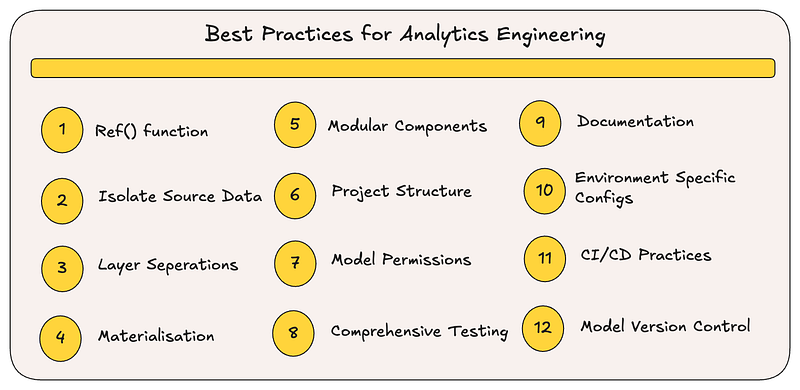
After working extensively with dbt in production environments across multiple organisations, I have compiled this expanded set of gold standards for dbt that have consistently saved time, reduced errors, and made data teams more efficient.
1. Use ref() function
This is dbt’s secret sauce! It lets dbt handle model dependencies and ensures correct build order. The ref() function creates a dependency graph that dbt uses to determine which models to build and in what order. This prevents the classic "table doesn't exist" errors and ensures your transformations run smoothly.
-- Instead of hardcoding table references:
SELECT * FROM raw_data.customer_orders

-- Use ref() to let dbt manage dependencies:
SELECT * FROM {{ ref('stg_customer_orders') }}
2. Isolate Source Data Touchpoints
Implement a dedicated staging layer as the single access point for raw data. This creates a clean separation between raw data and your transformations, making it easier to adapt when source systems change. When source systems changes, you will only need to update models in your staging layer rather than throughout your entire project.
Create staging models that:
- Standardise field naming conventions
- Handle data type conversions
- Implement basic quality filters
- Document field definitions and business context
3. Implement Source-to-Business Layer Separation
Establish clear boundaries between different types of transformation logic. Separate source-focused operations (cleaning and standardizing raw data) from business-oriented transformations (metrics calculations and business rule implementation). A typical architecture includes:
- Sources: Original data from your warehouse
- Staging: Cleansed data with consistent structure
- Intermediate: Joined and aggregated staging models
- Marts: Business domain-specific models ready for analytics
This separation enhances code organization and helps team members understand data lineage more intuitively.
4. Select Appropriate Materialization Strategies
Each materialization type offers distinct tradeoffs. Views deploy quickly but may perform poorly for complex queries. Tables provide faster query performance but require full rebuilds. Incremental models balance performance and build time with additional complexity. Match each model’s materialization to its specific usage patterns:
- Views: For exploration or infrequently accessed data
- Tables: For computationally intensive or commonly queried models
- Incremental: For large datasets with regular updates
- Ephemeral: For intermediary transformations that don’t need persistence
5. Breakdown Large Models Into Modular Components
Prioritise smaller, focused models over monolithic queries. Modular design improves testability, readability, and maintenance. When individual components handle specific transformation tasks, debugging becomes simpler and code reusability increases across your project.
Consider refactoring any SQL file exceeding a few hundred lines or containing numerous CTEs into multiple interconnected models.
6. Implement Logical Directory Organization
Thoughtful project structure dramatically improves navigation and maintenance. Organize directories by functional purpose rather than business domains to promote reusability. I have found that categorising by transformation stage — staging, intermediate, and mart models — creates a natural progression that mirrors data flow:
models/
├── staging/ # One directory per source system
│ ├── salesforce/
│ └── shopify/
├── intermediate/ # Joined/cleaned models
└── marts/ # Business-domain oriented
 ├── marketing/
 ├── finance/
 └── product/
7. Configure Permissions Through Model Definitions
Manage access control directly within model configurations to prevent security incidents. This declarative approach ensures that appropriate permissions get applied automatically whenever models are created or updated, eliminating manual permission management and reducing security gaps.
models:
 - name: sensitive_customer_data
 config:
 grants:
 select: ['analyst_role', 'data_scientist_role']
8. Implement Comprehensive Testing
Develop a robust testing strategy incorporating schema tests, data quality checks, and business logic validation. Effective testing prevents downstream issues by catching problems early in the development cycle. At minimum, implement tests that verify:
- Primary key uniqueness
- Referential integrity between models
- Non-null constraints for required fields
- Adherence to business rules and assumptions
9. Prioritise Thorough Documentation
Invest in comprehensive documentation that contextualises your models and explains their purpose. Leverage dbt’s built-in documentation capabilities to describe models, columns, and relationships. Well-documented projects reduce onboarding time and help all team members understand the data ecosystem.
models:
 - name: orders
 description: "Refined order data including customer information"
 columns:
 - name: order_id
 description: "Unique identifier for each order"
 tests:
 - unique
 - not_null
 - name: customer_id
 description: "References the customer who placed the order"
 tests:
 - relationships:
 to: ref('customers')
 field: id
10. Implement Environment-Specific Configuration
Use dbt’s environment targeting to create different behaviors in development versus production. This approach solves common challenges like keeping development fast and lightweight while ensuring production runs are optimised for performance and reduce the compute costs.
Real-world example: When working locally, you might want to:
- Use smaller data samples
- Build models as views for faster iteration
- Use less compute power to save costs
# In your dbt_project.yml
models:
 +materialized: table # Default for all models

 my_project:
 # Dev environment configurations
 +schema: "{{ 'dev_' + env_var('DBT_USER', 'default') if target.name == 'dev' else 'prod' }}"
 finance_models:
 # Use views in dev, tables in prod
 +materialized: "{{ 'view' if target.name == 'dev' else 'table' }}"
 # Only process 7 days of data in dev, full dataset in prod
 vars:
 lookback_days: "{{ 7 if target.name == 'dev' else 90 }}"
Then in your SQL models, leverage these variables:
SELECT *
FROM {{ ref('raw_transactions') }}
WHERE transaction_date >= DATEADD(day, -{{ var('lookback_days') }}, CURRENT_DATE())
This approach dramatically speeds up development cycles while maintaining full data coverage in production.
11. Establish CI/CD Workflows
Integrate dbt into continuous integration pipelines to automate validation before deploying to production:
- Verify syntax correctness with
dbt compile - Confirm data quality through
dbt test - Generate and review documentation changes
- Implement slim CI to selectively test modified models
These practices significantly reduce production incidents while accelerating development cycles.
12. Implement Version Control Discipline
Adopt Git or an equivalent version control system as a foundation for collaborative development. This provides:
- Comprehensive change history
- Rollback capabilities for problematic changes
- Structured collaboration through pull requests
- Code review processes that improve overall quality
The combination of version control and CI/CD creates a development workflow that scales effectively with team growth.
References
https://medium.com/@aradsouza/understanding-dbt-modelling-layers-and-their-purpose-ff393e96d83a
This article was originally published at https://medium.com/@aradsouza/12-gold-standards-for-dbt-success-1de5f9e50f66