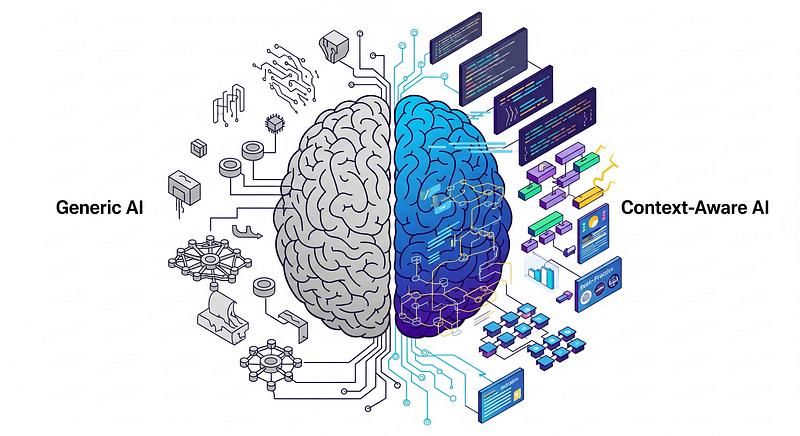
Part 2: How Context-Aware AI Transforms Code Reviews
In Part 1, we explored why code reviews have become such a bottleneck and why standard AI tools don’t solve the problem. Now let’s talk about what actually works: teaching AI to understand your specific context.
- Part 1: The Code Review Bottleneck Nobody Talks About
- Part 2: Teaching AI to Understand Your Codebase (deep dive on instruction writing)
- Part 3: Building Context-Aware AI for Your Team (detailed implementation guide)
The results speak for themselves:
- PR review time: 2–4 days → 1–2 hours (75% reduction)
- Pre-commit failures: 35% → 7% (80% reduction)
- Revision cycles: 2–4 → 1–2 per PR (48% reduction)
- Test coverage: 60% → 92% (+32 points)
- Documentation compliance: 45% → 88% (+43 points)
- Standards adherence: 70% → 100% (+30 points)
These aren’t projections. This is what happened when we implemented context-aware AI on a real data engineering project with dozens of developers and hundreds of models.
The breakthrough: Custom Instructions
The solution came from a feature that many people overlook: GitHub Copilot’s Custom Instructions. Specifically, the ability to create instruction files in your repository that Copilot reads before every interaction.
Think of it like this: if Copilot is a brilliant new team member who knows everything about software engineering in general, Custom Instructions are the onboarding documents that teach them how your team specifically works.
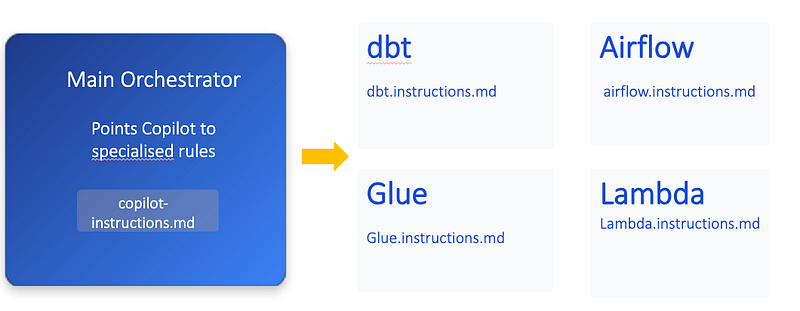
There are two approaches to organizing instructions:
Repository-wide (simpler, works everywhere):
.github/
└── copilot-instructions.md
Path-specific (advanced, more granular control):
.github/
├── copilot-instructions.md
└── instructions/
 ├── dbt.instructions.md
 ├── airflow.instructions.md
 └── glue.instructions.md
Start with repository-wide. It works in all IDEs (VS Code, Visual Studio, JetBrains, Xcode, GitHub CLI). Path-specific instructions currently work best in VS Code and GitHub.com for Copilot Coding Agent and Code Review features.
But the real magic isn’t in the folder structure — it’s in what you put into those files and how you structure the knowledge.

What makes this different from documentation
You might be thinking: “We already have documentation. We have wiki pages and README files. Why is this different?”
Here’s why:
Documentation is passive. It sits there waiting for someone to search for it, find it, read it, remember it, and apply it. Custom Instructions are active. They’re automatically applied every time Copilot reviews code.
Documentation gets outdated. That wiki page written two years ago? Nobody’s sure if it still applies. Custom Instructions live in your repo. They’re versioned. They evolve with your code.
Documentation is scattered. Best practices for data models are in one place, testing standards are somewhere else, deployment patterns are in a different wiki entirely. Custom Instructions consolidate what matters for each context.
Documentation doesn’t teach — it tells. Custom Instructions can include examples, explanations of why certain patterns exist, and guidance on common mistakes. They’re pedagogical, not just informational.
Nobody reads documentation consistently. Be honest — when was the last time you read your team’s entire wiki before starting work? Custom Instructions are consumed by AI that does read them consistently, every single time.
The anatomy of effective Custom Instructions
Let’s break down what actually goes into these files. I’ll use a data engineering context as an example, but the principles apply to any domain with established patterns.
The orchestrator file
The main copilot-instructions.md acts as a routing layer. It tells Copilot how to think about the codebase:
# Project Context for Code Reviews
This repository contains data transformation pipelines built with
multiple technologies. When reviewing code, apply the appropriate
technology-specific guidelines.


## Technology Stack
- Data transformation: dbt (see dbt.instructions.md)
- Orchestration: Airflow (see airflow.instructions.md)
- Serverless processing: AWS Lambda (see lambda.instructions.md)
- ETL jobs: AWS Glue (see glue.instructions.md)


## General Principles
- All code must be tested
- All code must be documented
- Configuration over hardcoding
- Fail fast with clear error messages
This gives Copilot a map of the landscape and points it toward more specific guidance.
Technology-specific instruction files
This is where the real knowledge lives. A dbt.instructions.md file might contain:
# dbt Model Standards## Staging Models
Staging models extract and lightly transform data from sources.

### Required Patterns
1. **Incremental Strategy**
 - All staging models must be incremental
 - Must include delete_old_records pre-hook
 - Example:
```sql\
 {{ config(\
 materialized='incremental',\
 unique_key='id',\
 pre_hook=[\
 "{{ delete_old_staging_records() }}"\
 ]\
 ) }}\
- Source Deduplication
- Models loading from certain sources must deduplicate
- Use dbt_utils.deduplicate() with appropriate unique key
- Why: Source systems may contain duplicate records
- Primary Key Requirements
- Every staging model must have a unique_key
- Must include tests: unique, not_null
- Example:
 - name: stg_model_name\
 columns:\
 - name: id\
 tests:\
 - unique\
 - not_null\
Common Mistakes
- Forgetting pre-hooks on incremental models
- Using SELECT * (must specify columns explicitly)
- Missing tests on primary keys
- Hardcoding table names instead of using source() macro
Why These Patterns Exist
- Pre-hooks prevent data duplication in incremental loads
- Explicit column selection makes schema changes visible
- Primary key tests catch data quality issues early
Notice what this includes:
* **Required patterns** with specific code examples
* **Explanations** of why patterns exist
* **Common mistakes** to watch for
* **Examples** of correct and incorrect code
This isn’t just rules — it’s teaching.
### Path-specific instructions (advanced)
For more granular control, you can create instruction files that apply only to specific file types or directories. These require YAML frontmatter with an `applyTo` field:
applyTo: - "models//*.sql" - "/*.sql"
SQL Model Standards
These instructions apply only to SQL files in the models directory.
Required Patterns
[Your specific SQL instructions here]
The `applyTo` field uses glob syntax:

* `**/*.sql` - All SQL files anywhere
* `models/**/*` - All files under models/

**When to use path-specific instructions:**

* Different standards for different file types
* Technology-specific rules (SQL vs Python vs YAML)
* Test files vs production code requirements
* Legacy code vs new code standards

**Important:** Path-specific instructions currently work best in VS Code and GitHub.com. For maximum compatibility, start with repository-wide instructions.

### The three-tier approach to instructions

We found that instructions work best when organized in three tiers:

### Tier 1: Critical Rules

These are non-negotiable. Missing them means the code doesn’t work or creates serious problems. Flag these as CRITICAL in your instructions.

Example: “CRITICAL: All incremental models must include the delete\_old\_records pre-hook. Missing this will cause data duplication.”

### Tier 2: Standards and Best Practices

These are strongly recommended patterns that ensure consistency and quality. Flag these as WARNING.

Example: “WARNING: Models should specify columns explicitly rather than using SELECT \*. This makes schema changes visible in PR diffs.”

### Tier 3: Suggestions and Improvements

These are nice-to-haves that improve code quality but aren’t blockers. Flag these as INFO or SUGGESTION.

Example: “SUGGESTION: Consider extracting this complex CTE into an intermediate model for better maintainability.”

This tiered approach helps developers prioritize what to fix and helps reviewers understand what really matters.

### From generic to specific: A real example

Let me show you the difference between generic AI feedback and context-aware feedback on the same piece of code.

**The code:** A staging model that’s functionally correct but non-compliant with standards.
-- stg_customer_assets.sql SELECT * FROM raw.customer_assets WHERE updated_at > '2024-01-01'
**Generic Copilot review:**

* “Consider adding comments to explain the date filter”
* “The SELECT \* pattern could be replaced with explicit columns”

**Context-aware Copilot review:**

* 🚨 CRITICAL: “Missing incremental materialization config and delete\_old\_records pre-hook. This will cause data duplication on subsequent runs.”
* 🚨 CRITICAL: “Must use source() macro instead of hardcoded table name ‘raw.customer\_assets’”
* ⚠️ WARNING: “SELECT \* is not allowed. Must specify columns explicitly.”
* ⚠️ WARNING: “Missing unique and not\_null tests on primary key”
* ⚠️ WARNING: “No deduplication step. Customer assets may contain duplicates from the source system.”
* ℹ️ INFO: “Missing model description in schema.yml”

See the difference? Generic feedback is about code style. Context-aware feedback is about your specific architecture and standards.

### The transformation in practice

Let’s walk through a realistic scenario to see how this changes the development workflow.

### Before: The manual review gauntlet

**Monday 9 AM:** Developer submits PR for new staging model. Code works, tests pass locally.

**Tuesday 3 PM:** Reviewer finally gets to the PR. Leaves comments:

* “Missing pre-hook. See our staging model standards.”
* “Need to add deduplication. Check the wiki.”
* “Where are the PK tests?”

**Wednesday 10 AM:** Developer reads feedback, searches wiki, finds outdated page, asks in Slack for clarification.

**Wednesday 3 PM:** Makes changes, pushes update.

**Thursday 11 AM:** Reviewer checks again, finds new issues:

* “Wrong deduplication key — should use composite key”
* “Still need documentation”

**Friday 9 AM:** Another revision.

**Friday 4 PM:** Finally approved after multiple cycles.

**Total time:** 4 days of calendar time, multiple context switches, frustration on both sides.

### After: The context-aware workflow

**Monday 9 AM:** Developer starts writing the staging model.

**Monday 9:15 AM:** Uses Copilot in IDE, which suggests config based on custom instructions. Developer accepts, gets it right the first time.

**Monday 10 AM:** Submits PR. Asks Copilot to review before requesting human review.

**Monday 10:02 AM:** Copilot flags three issues with specific guidance. Developer fixes immediately.

**Monday 10:30 AM:** Requests human review.

**Monday 11 AM:** Human reviewer sees Copilot’s feedback was addressed, focuses on business logic review.

**Monday 11:30 AM:** Approved.

**Total time:** 2.5 hours, single cycle, minimal friction.

### What changed beyond the speed

The quantitative improvements are impressive, but the qualitative changes matter just as much:

**Reviewer fatigue vanished.** When you don’t have to mentally check the same twenty requirements on every PR, you have energy left for things that actually require human judgment — architectural decisions, business logic, edge cases.

**Developers learned faster.** Instead of waiting days for feedback, they get instant, specific, actionable guidance. They start internalizing the patterns. New team members come up to speed in weeks instead of months.

**Standards became consistent.** Human reviewers are variable — we have good days and bad days, and we emphasize different things. Context-aware Copilot enforces standards consistently every single time.

**The conversation shifted.** Code review comments moved from “you forgot to add this boilerplate” to “have we considered this alternative approach for handling edge cases?” The human reviewer became an enabler focused on value-add feedback.

**Onboarding accelerated.** New developers get real-time teaching about patterns and standards. They don’t just fix issues — they understand why certain patterns exist.

### The self-reinforcing cycle

Here’s something unexpected: context-aware AI creates a positive feedback loop.

When initial code quality goes up (because developers are getting real-time guidance), human reviewers have more time and energy. When reviewers have more capacity, they can provide better strategic feedback. When developers get better strategic feedback, they improve further.

We saw a virtuous cycle:

1. Copilot catches compliance issues instantly
2. Developers fix them before human review
3. Human reviewers focus on architecture and logic
4. Developers learn better patterns from strategic feedback
5. Code quality improves beyond just compliance
6. The bar raises for everyone

Within a few weeks, developers started taking more pride in their initial submissions. They knew Copilot would catch basic issues, so they made sure to get those right before even asking for AI review. The overall craftsmanship of the codebase improved.

### The hidden benefit: Living documentation

Something we didn’t anticipate: the custom instruction files became our best documentation.

When new team members join, we tell them to read the instruction files. They’re more useful than our old wiki pages because they’re:

* **Focused:** Only what matters for each technology
* **Up-to-date:** Changed with the code they describe
* **Actionable:** Not just descriptions but specific patterns to follow
* **Example-rich:** Show don’t just tell

The instructions also expose inconsistencies in our own thinking. Writing things down precisely forces you to confront ambiguities. We discovered we had some “standards” that were actually just preferences of whoever was reviewing that day. Codifying them made us more consistent.

### Why context is everything

The fundamental insight here is that generic AI is powerful but limited. It becomes transformative when you give it specific context.

Think about the knowledge that exists in your team:

* The incident three years ago that taught you why certain patterns matter
* The architectural decisions documented in RFC #47 that nobody remembers
* The unwritten rules that everyone “just knows” after a year on the team
* The common mistakes that new developers always make

This knowledge has been expensive to accumulate. It’s locked in senior engineers’ heads. New team members learn it slowly through osmosis and trial and error.

Custom Instructions are a way to unlock that knowledge and make it instantly accessible to everyone — through an AI intermediary that applies it consistently, every time, at exactly the moment it’s needed.

### What this means for your team

The pattern we’ve described isn’t specific to data engineering or dbt. It works for any domain with:

* Established patterns and standards
* Multiple technologies in a stack
* Team-specific architectural decisions
* Accumulated wisdom about what works
* A need for consistency across many contributors

That includes:

* Infrastructure as code (Terraform, CloudFormation)
* Backend services with specific patterns
* Frontend applications with design systems
* Mobile apps with platform-specific guidelines
* DevOps pipelines with security requirements

Anywhere you have knowledge that needs to be applied consistently but is currently trapped in people’s heads — that’s where context-aware AI can help.

### The investment required

Let’s be practical about what this actually takes to implement.

**Initial time investment:** Expect 20–40 hours to create comprehensive instructions for your main technology stack. This is writing, example-finding, and refining based on real code.

**Ongoing maintenance:** Perhaps 2–3 hours per month as you refine based on usage, add new patterns, and update for changes.

**The hard part:** You need someone with deep domain knowledge to write these. You can’t outsource it to someone who doesn’t understand your systems. The value comes from encoding genuine expertise.

**The easy part:** The technical implementation is trivial. Create some markdown files. Commit them to your repo. Done.

Compare this to the cost of slow code reviews: if each delayed PR costs even one day of developer time, and you have dozens of PRs per sprint, the ROI is enormous.

But beyond the economics, there’s the morale improvement from unblocking developers and reducing reviewer fatigue. That doesn’t show up in a spreadsheet, but it matters enormously.

### Looking ahead

In Part 3, we’ll cover the practical implementation: exactly how to structure your instruction files, how to test and refine them, how to roll them out to your team, and how to measure the impact.

We’ll also address the limitations and challenges — this isn’t magic, and there are real constraints on what context-aware AI can and cannot do.

But the core insight remains: the difference between generic AI and transformative AI is context. The teams that figure out how to encode their expertise into AI systems will have a significant advantage.

**Want to go deeper?**

Go through the three-part series:

* [Part 1: The Code Review Bottleneck Nobody Talks About](https://aradsouza.medium.com/the-code-review-bottleneck-nobody-talks-about-4e601a3e556f)
* [Part 2: Teaching AI to Understand Your Codebase (deep dive on instruction writing)](https://medium.com/@aradsouza/teaching-ai-to-understand-your-codebase-8e95865ebffc)
* [Part 3: Building Context-Aware AI for Your Team (detailed implementation guide)](https://medium.com/@aradsouza/building-context-aware-ai-for-your-team-cc808474ed6f)

---

*This article was originally published at <https://medium.com/@aradsouza/teaching-ai-to-understand-your-codebase-8e95865ebffc>*