If you haven’t explored my full dbt CI/CD pipeline series yet, I highly recommend starting with the complete article collection here:
👉 Building a Production-Ready dbt CI/CD Pipeline: Complete Series
This companion article is dedicated to sharing the GitHub repository that supports the series — so you can dive into the code, explore the implementation, and start building your own production-ready pipeline.
Linkedin Profile
https://www.linkedin.com/in/alwynanildsouza/
Repository Link :
[**GitHub - alwyndsouza/dbt-ci-cd**
*Contribute to alwyndsouza/dbt-ci-cd development by creating an account on GitHub.*github.com](https://github.com/alwyndsouza/dbt-ci-cd "https://github.com/alwyndsouza/dbt-ci-cd")
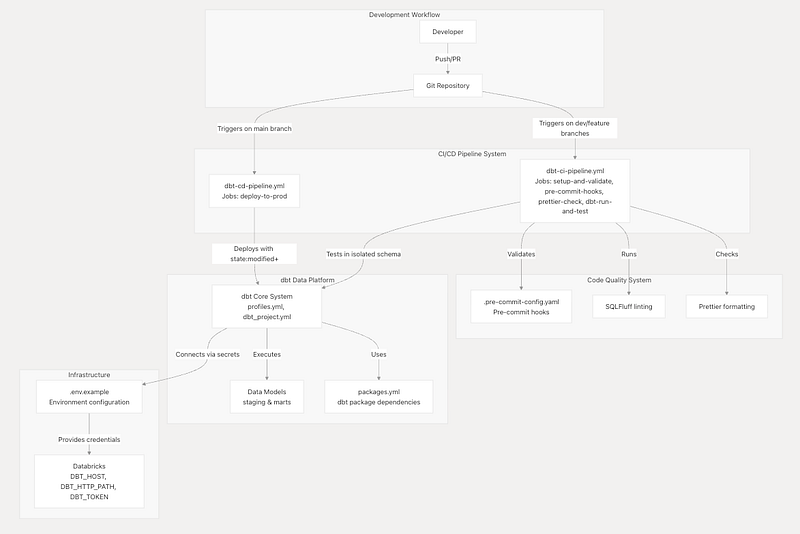
High Level Architecture
This below diagram provides comprehensive overview of the dbt CI/CD system architecture, detailing how automated pipelines, code quality systems, and infrastructure components work together to enable reliable data transformation development and deployment. The architecture implements enterprise-grade practices including isolated testing environments, state-aware deployments, and multi-layered quality assurance.
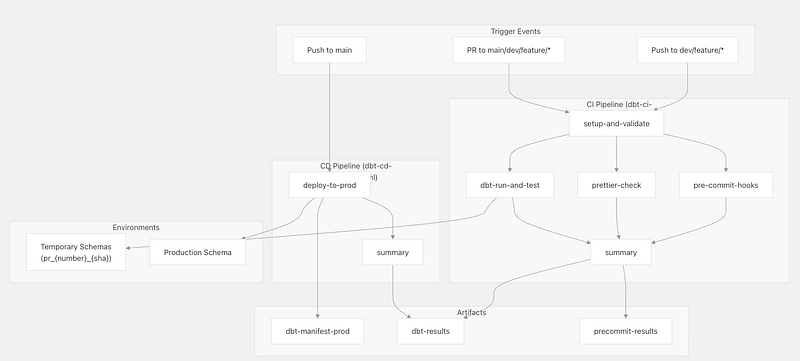
Pipeline Architecture Overview
The CI/CD system implements a two-stage pipeline architecture with clear separation between validation and deployment concerns.
CI Pipeline
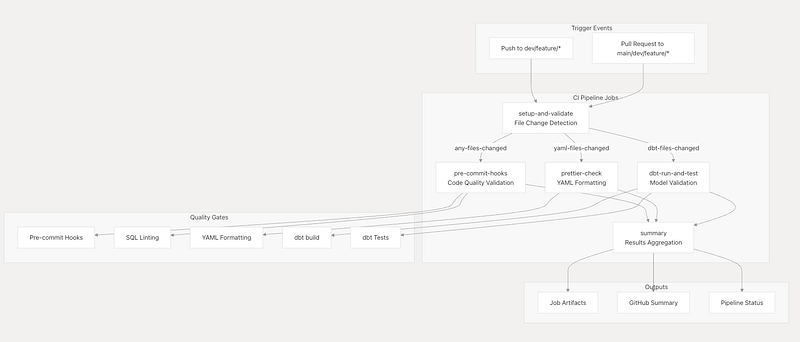
The CI pipeline serves as the primary quality gate for all code changes, implementing a multi-stage validation process that prevents broken code from reaching production. The pipeline runs automatically on pushes to development branches and pull requests, providing immediate feedback to developers.
Trigger Conditions and Concurrency Management
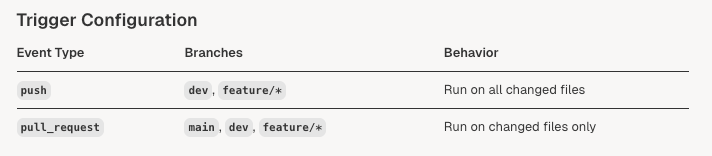
The pipeline uses sophisticated trigger conditions and concurrency controls to optimize resource usage and provide fast feedback.
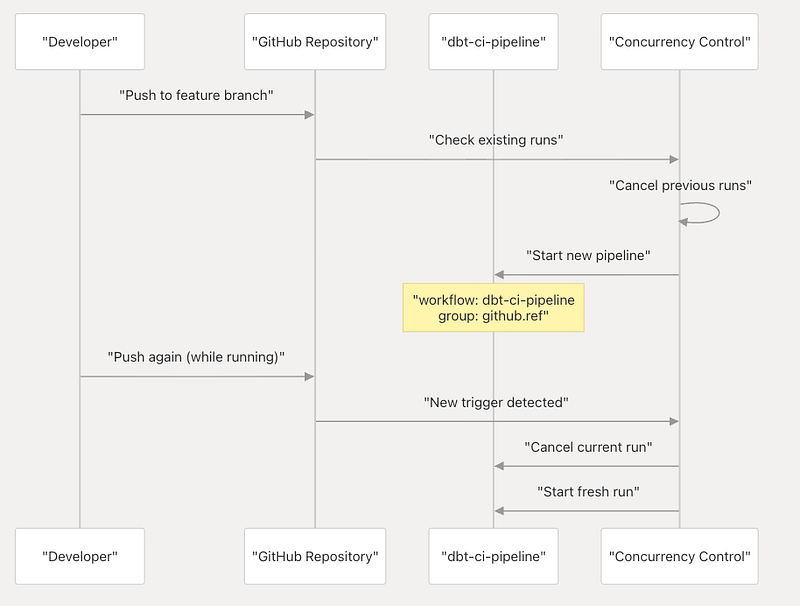
Dynamic Schema Management
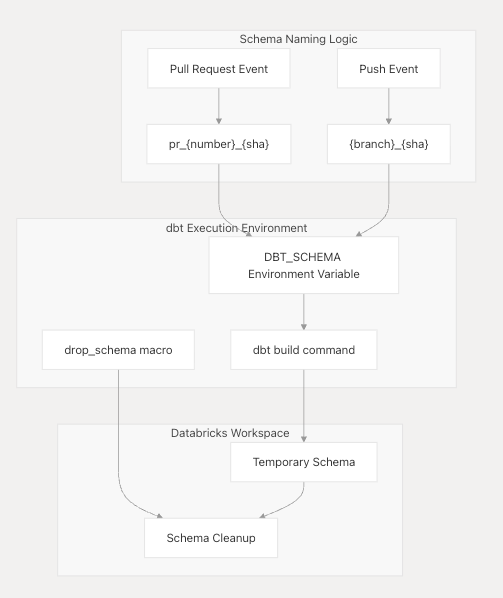
One of the most sophisticated features of the CI pipeline is its dynamic schema creation for test isolation.
Schema Generation Logic The dynamic schema naming is implemented.
- Pull Requests:
pr_{PR_NUMBER}_{COMMIT_SHA} - Branch Pushes:
{BRANCH_NAME}_{COMMIT_SHA}(with special character sanitization)
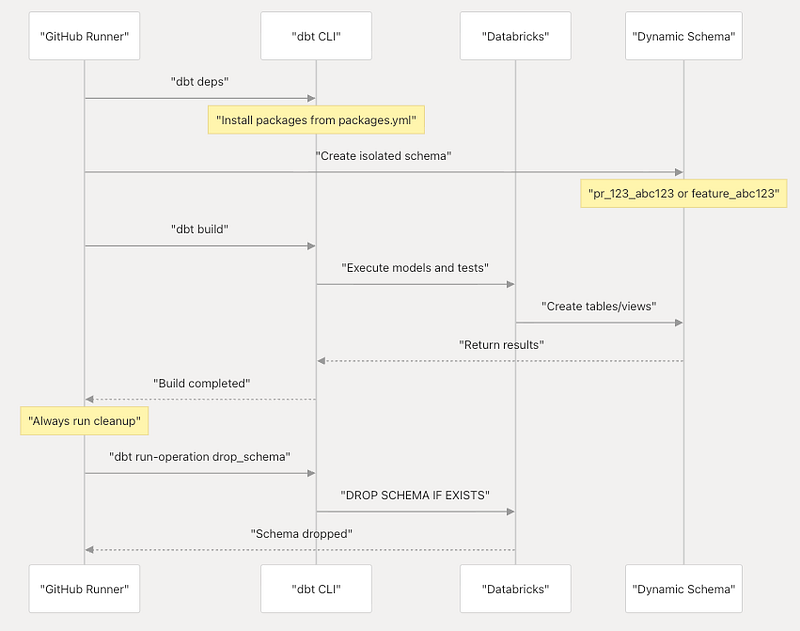
Cleanup Process The pipeline ensures proper resource cleanup by always running the schema cleanup step even if the build fails:
dbt run-operation drop_schema --args '{ "schema_name": "${{ env.DBT_SCHEMA }}" }'
dbt Build and Test Execution
The core dbt validation job runs the complete build process in an isolated environment.
CD Pipeline
The Continuous Deployment Pipeline is responsible for deploying validated dbt changes to the production environment. This system automatically triggers when code is merged to the main branch, performing state-aware deployments that only build modified models and their downstream dependencies.
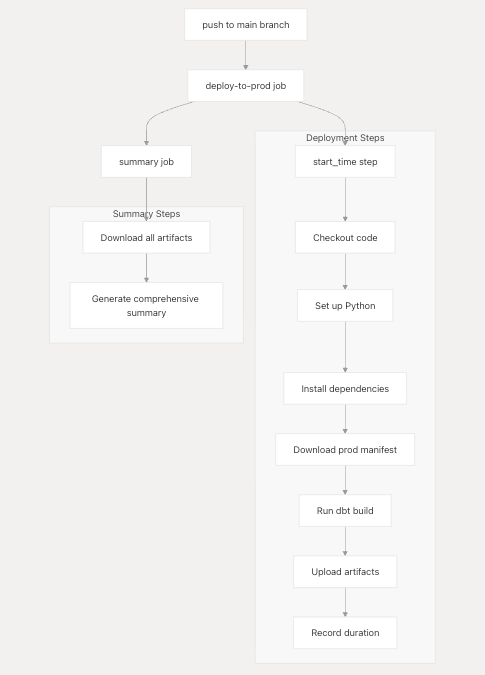
State-Aware Deployment Strategy
The pipeline implements intelligent deployment logic that minimizes execution time by only building modified models.
Manifest Download and State Detection
The deployment strategy uses the Legit-Labs/action-download-artifact@v2 action to retrieve the previous production manifest:
- Artifact Name:
dbt-manifest-prod - Path:
prod-artifactsdirectory - Workflow Source:
dbt-cd-pipeline.yml - Continue on Error:
true(gracefully handles first deployment)
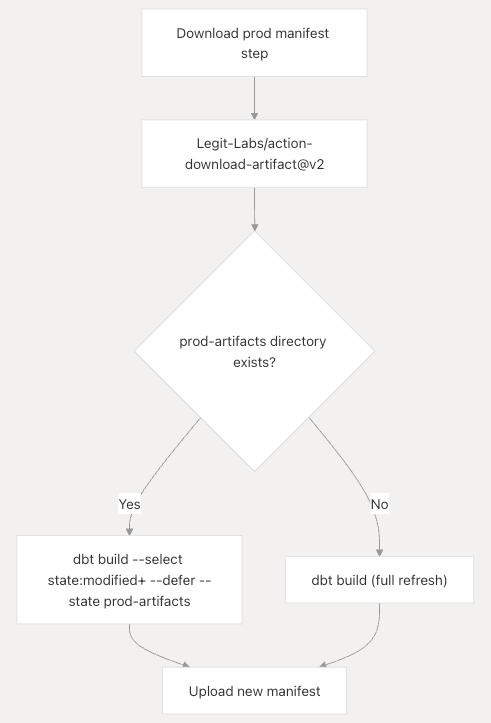
Build Execution Logic
The build step implements conditional logic for optimal deployment:
# State-based build (when previous manifest exists)
This approach:
- Reduces deployment time by only building changed models and their dependencies
- Maintains data consistency through the
state:modified+selector - Enables safe rollback by deferring to previous state when possible
- Handles first deployment gracefully with full build fallback
Artifact Management System
The pipeline maintains deployment state through comprehensive artifact management.
Artifact Upload Strategy

Manifest Artifact
- Name:
dbt-manifest-prod - Path:
target/manifest.json - Condition: Only on successful builds
- Retention: 7 days
- Purpose: Enables state-based deployments for subsequent runs
Results Artifact
- Name:
dbt-results - Path:
dbt_results.md - Condition: Always uploaded (success or failure)
- Retention: 7 days
- Purpose: Provides deployment logs and debugging information
Development Workflow and Code Quality
This document covers the development workflow and automated code quality enforcement systems that ensure consistent, high-quality code in the dbt project. It details the multi-layered quality gates from local development through CI/CD deployment, including pre-commit hooks, SQL linting, formatting standards, and automated validation processes.
Development Workflow Overview
The development workflow implements a multi-stage quality assurance process that validates code changes at multiple checkpoints before deployment.
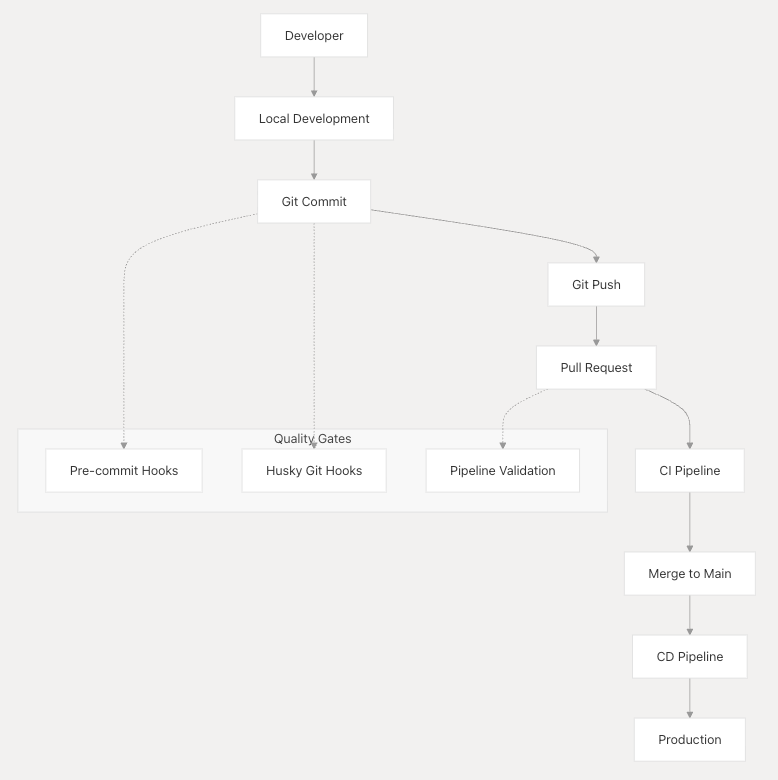
Pre-commit Hook System
The pre-commit system is configured via .pre-commit-config.yaml and provides comprehensive code quality validation through multiple specialized tools.
Pre-commit Hook Execution Flow
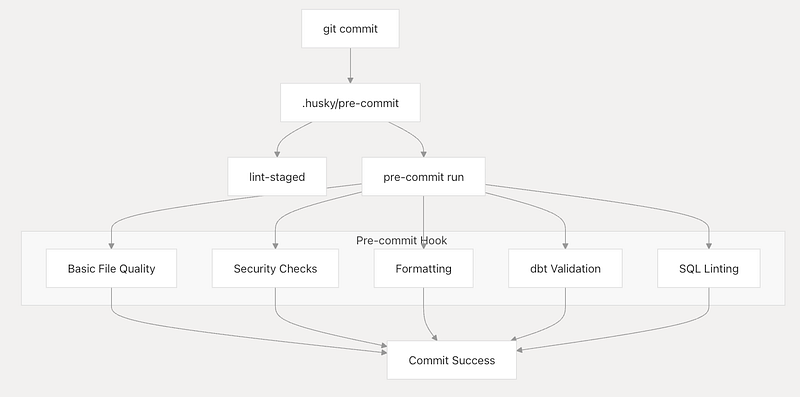
Hook Categories and Configuration
Basic File Quality Checks
These hooks ensure fundamental file consistency and prevent common issues:
trailing-whitespaceRemoves trailing whitespace from SQL, YAML, and Markdown filesend-of-file-fixerEnsures files end with newlinescheck-added-large-filesPrevents large files (>1MB) from being committedmixed-line-endingStandardizes line endings to LF
Security Validation
Security hooks prevent accidental exposure of sensitive information:
gitleaksScans for secrets, API keys, and credentialsdetect-private-keyIdentifies private SSH keyscheck-case-conflictPrevents case-sensitivity issues
dbt-Specific Validation
The dbt-checkpoint hooks ensure dbt best practices and project consistency:
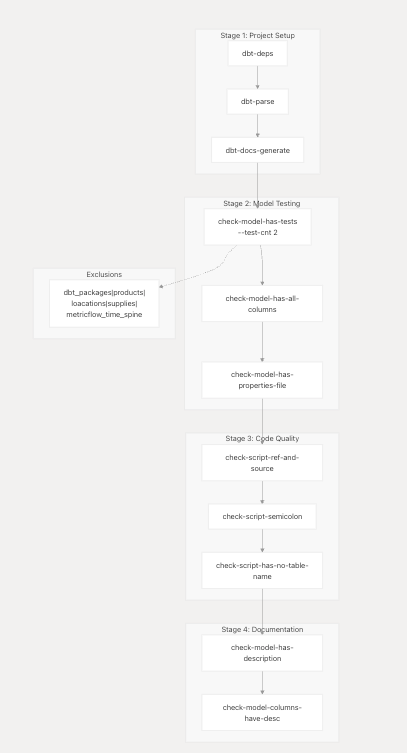
Git Hooks and Automation
The Git hooks automation system provides a lightweight, fast quality gate that runs before commits are allowed to proceed. This system complements the more comprehensive pre-commit hooks by focusing on immediate file-level quality checks.
Husky Git Hook Management
Husky manages Git hooks through Node.js tooling, providing a reliable cross-platform solution for hook execution. The system is configured to run multiple validation steps automatically.
Hook Configuration
The pre-commit hook executes two primary validation steps:
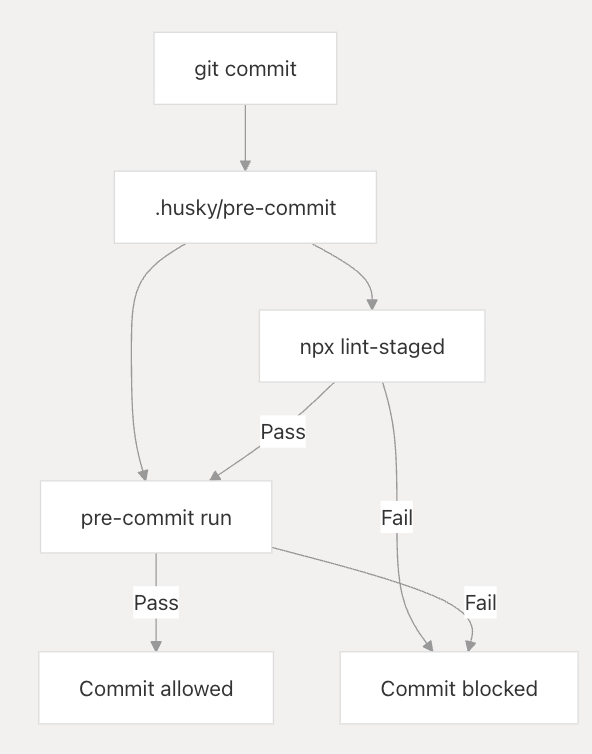
The hook implementation runs both lint-staged for file-specific formatting and the broader pre-commit framework validation.
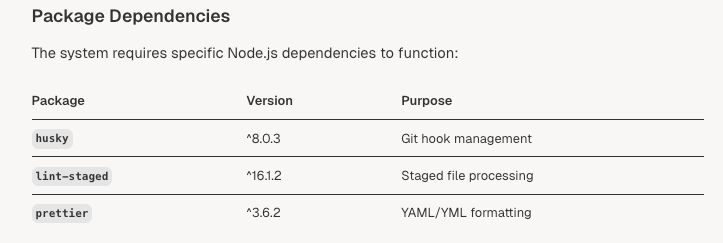
Lint-Staged Integration
The lint-staged tool ensures only modified files are processed for formatting, improving performance by avoiding full-repository scans.
File Pattern Configuration
The system targets YAML configuration files across the repository:

The configuration processes all .yml and .yaml files in the repository, automatically formatting them according to Prettier standards.
Automation Scripts
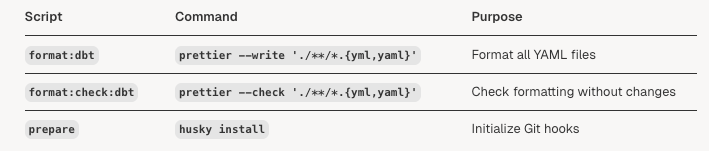
The package defines utility scripts for manual formatting operations:
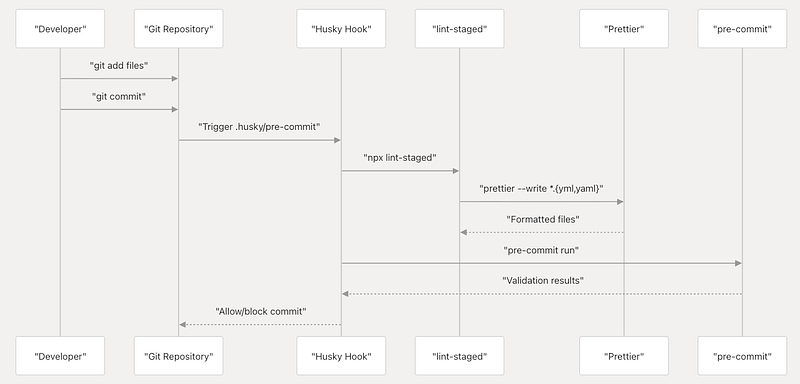
Workflow Integration
The automation system integrates with the development workflow through multiple touchpoints:
Installation and Setup
The system initializes automatically through the prepare script, which runs during npm install:
- Package installation triggers the
preparescript husky installcreates the.huskydirectory and hook files- Git hooks become active for the repository
Configuration Management
The automation system relies on centralized configuration in package.json rather than distributed config files. This approach ensures consistent behavior across development environments.
Hook Execution Order
The pre-commit hook executes operations in a specific sequence:
npx lint-staged- Format staged YAML filespre-commit run- Execute broader validation suite
This ordering ensures files are properly formatted before comprehensive validation begins.
Performance Considerations
The system is optimized for speed through several design decisions:
- Only staged files are processed by
lint-staged - YAML formatting is limited to configuration files
- Parallel execution of independent validation steps
This article was originally published at https://medium.com/@aradsouza/from-theory-to-production-the-dbt-ci-cd-pipeline-codebase-5fc2f2ffd637